
 My PC Doctor · Your Personal PC Care Assistant
Know Your PC Better
My PC Doctor helps you understand the health and important status of your Windows PC.
Need expert help? Contact Yadav Computer Shop
For Windows 10 (version 1809 or later) and Windows 11, 64-bit and 32-bit. Downloads come from the official My PC Doctor website.
What is My PC Doctor?
A PC care assistant for everyday users
My PC Doctor is a Windows PC care assistant designed to help you understand important information about your computer and identify areas that may need attention. It explains what it finds in plain words, without technical language getting in the way.
Designed for everyday PC users.
Why use My PC Doctor?
Know before you need a repair
- Understand your PC in plain words
- Check important PC conditions
- Identify areas needing attention
- Keep your PC's configuration at hand
- Get clearer information before contacting support
- Connect PC health information with real technical support
What can it check?
What My PC Doctor Can Help You Check
Every item below is part of the app today.
PC Health Check
One check across the important parts of your PC, with an overall result you can read at a glance.
Windows
Edition, build, update state, system file integrity and the crash history Windows already keeps.
Drivers
Installed drivers with versions and dates, and the devices Windows has flagged — with what each code means.
Storage & SSD
Every drive, its type, free space and the health indicators Windows exposes for it.
Memory
Installed capacity, how much is in use, the modules fitted and the slots still free.
Graphics
Graphics cards, video memory and the driver behind them.
Display
Resolution and refresh rate, against what the monitor itself says it can do.
Network
The adapter in use, its link speed and the network type Windows has set.
System Information
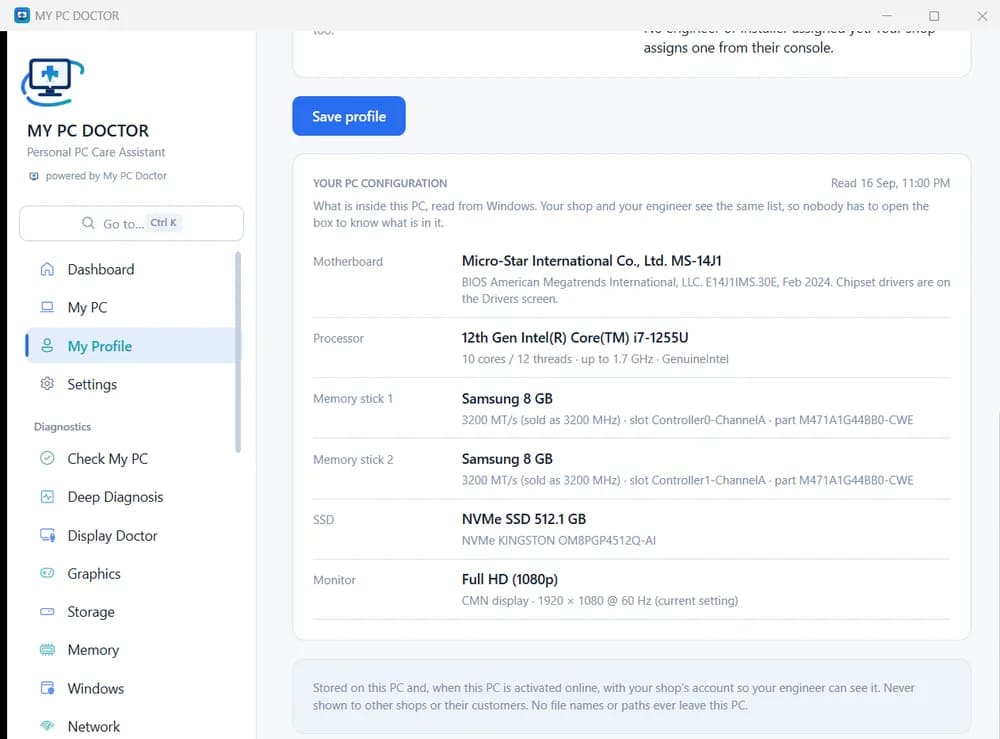
Processor, motherboard and BIOS, memory, drives and monitor — your PC's configuration in one place.
Health Report
What was found, in plain words, with the next step written out as a short prescription.
How it works
Install → Check → Understand → Take Action
- 1
Install
Install My PC Doctor on your Windows PC. It installs for your account only — no administrator rights, no restart.
- 2
Check
Open the app and choose Check My PC to run a PC health check.
- 3
Understand
Review what it found for each area, with the technical evidence behind it if you want it.
- 4
Take action
Follow the suggested steps where appropriate, or contact Yadav Computer Shop for technical support.
Real screens from the app
See My PC Doctor in Action
Reading your results
What the health check tells you
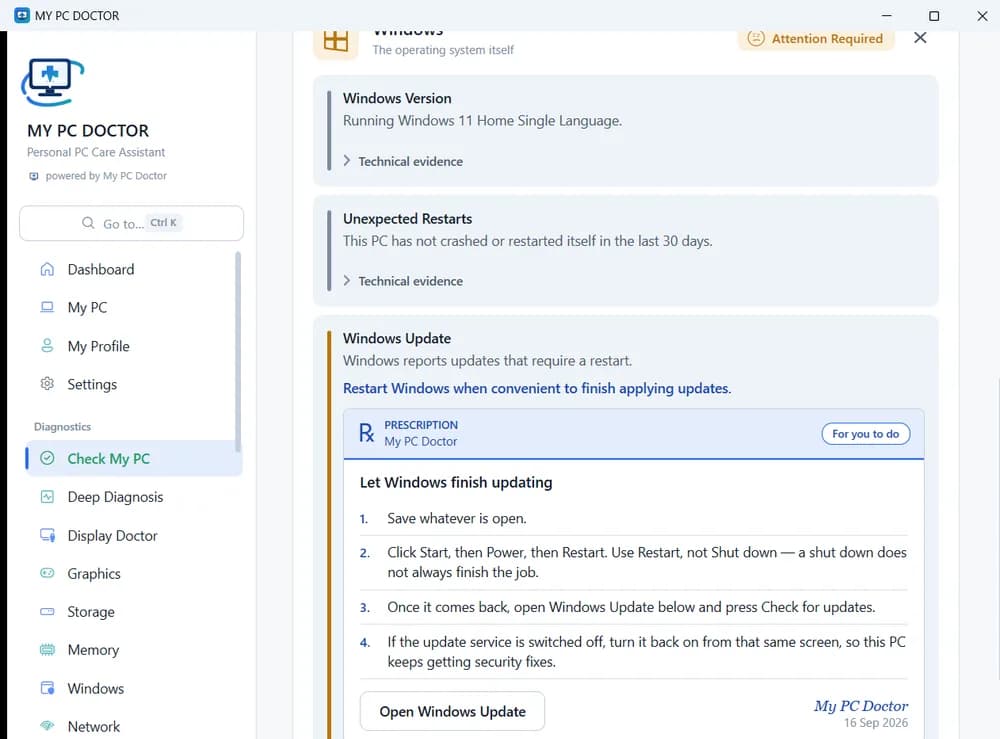
- Status for each area. Windows, drivers, storage, memory, graphics, display and network are checked separately, so you can see which one needs attention.
- A prescription when action is needed. Short, numbered steps — and a note on whether it is something for you to do.
- Technical evidence, if you want it. The details behind each finding stay one click away, ready to show a technician.
- Observations, not guesses. Results report what Windows and your hardware show at that moment — not a verdict on every possible fault.
When you need technical support
Some fixes need a technician.
Hardware faults, upgrades, screen or battery replacement, or anything you are not comfortable doing yourself — bring your PC to Yadav Computer Shop in Raipur. Show us the My PC Doctor report and we start from the evidence.
- Diagnosis
- Repair
- Upgrade
- Installation
- Maintenance
- Support
My PC Doctor by Yadav Computer Shop
Built to extend our computer service beyond the service desk
My PC Doctor is offered and supported by Yadav Computer Shop, Raipur, and powered by Biz Brain AI. It is connected to a real technical service business: when the app says your PC needs a person, our engineers are here.
- No remote access, remote control or screen sharing — only information you choose to share.
- Installs for your Windows account only; nothing added to startup.
- Updates itself, checking the published checksum before installing.
Ready to Know Your PC Better?
Install My PC Doctor and get a clearer view of your Windows PC.
- Windows
- Windows 10 (version 1809 or later) and Windows 11, 64-bit and 32-bit
- Installation
- For your Windows account only — no administrator rights, no restart.
- Activation
- Every PC is activated with a key, and the key is free — ask us. Each install includes a free year with every feature.
Questions
My PC Doctor FAQ
Answers based on what the app does today.
What is My PC Doctor?
My PC Doctor is a Windows PC care assistant that checks important parts of your computer — Windows, drivers, storage, memory, graphics, display and network — and explains what it finds in plain words. It is offered and supported by Yadav Computer Shop and powered by Biz Brain AI.
Who is My PC Doctor for?
Everyday Windows users at home or in an office who want to understand their PC without technical knowledge.
What does My PC Doctor check?
Processor, memory, storage and SSD health indicators, graphics, display, network, Windows (edition, updates, system files, crash history), drivers, and BIOS and firmware details, with a health report and suggested next steps.
Which Windows versions are supported?
Windows 10 (version 1809 or later) and Windows 11, on 64-bit and 32-bit PCs. It does not run on Mac or Linux.
How do I install My PC Doctor?
Download the installer from the official My PC Doctor website and run it. It installs for your Windows account only — no administrator rights, no restart, nothing added to startup. The app is not code-signed yet, so Windows SmartScreen may warn on first run; we can install it for you at the shop.
Is there a cost?
Every PC is activated with a key, and the key is free — ask Yadav Computer Shop and we will help you get one. Each install includes a free year with every feature, counted from the day the PC is registered.
How do I run a PC health check?
Open My PC Doctor and choose Check My PC. It reads your PC's status and shows the result with any recommended actions.
Does My PC Doctor repair my computer automatically?
No. It does not change or repair your PC by itself, and it has no remote access. It shows what it found and the next step; for anything it cannot help with, a technician can.
When should I contact Yadav Computer Shop?
When the report points to a hardware problem, an upgrade, or a fix you are not comfortable doing yourself — or whenever your PC is not working properly. Bring the report; we start with the evidence.
Is My PC Doctor connected with Yadav Computer Shop?
Yes — Yadav Computer Shop offers My PC Doctor to its customers, helps you get your free activation key, and provides the repair, upgrade and support behind it.