
Computer service in Raipur
Professional Computer Service & Technical Support
Desktop, Laptop & Printer repair, installation, upgrades and technical support for home and business users.
Shop No. 17A, Second Floor, Millennium Plaza, G.E. Road, Raipur, Chhattisgarh
Our services
Computer Repair & Technical Services
Repair, installation, upgrades and support for desktops, laptops and printers in Raipur.
Desktop Service
Desktop PC diagnosis, repair, cleaning, upgrades and Windows problems — at our service desk in Raipur.
Book Desktop ServiceLaptop Repair
Laptop troubleshooting, hardware repair, upgrades, cleaning and performance support.
Book Laptop RepairComputer Hardware Repair
Desktop hardware diagnosis and repair: power, display, RAM, storage, motherboard and upgrades.
Book Hardware RepairLaptop Screen Replacement
Screen replacement for cracked, damaged, flickering or non-working laptop displays.
Replace ScreenLaptop Battery Replacement
Battery replacement and battery-related troubleshooting for supported laptop models.
Replace BatteryPrinter Installation
Printer installation, driver setup, Wi-Fi configuration and printer support for home and office.
Install My PrinterSoftware Installation
Windows installation, drivers, everyday software and fixing a slow or problem Windows.
Book Software InstallationPC Upgrade (RAM & SSD)
SSD and RAM upgrades for desktops and laptops, with your Windows and data moved across.
Book a PC Upgrade
Hardware engineering
Your Computer. Diagnosed Properly. Serviced Professionally.
Sometimes software can tell you what is happening. Sometimes your PC needs an experienced technician — with the right tools, parts and time to test it properly.
What our engineers check
- Power & SMPSNo power, restarts and power-supply faults
- Display & graphicsNo display, lines, flicker, driver fallback
- StorageSlow or failing drives, SSD upgrades, data
- MemoryRAM faults, beeps, upgrades
- Heat & cleaningOverheating, fan noise, dust
- Windows & driversErrors, crashes, reinstall, setup
 Our PC care product
Meet My PC Doctor
Your Personal PC Care Assistant
My PC Doctor helps you check important aspects of your Windows PC, understand its current condition and identify areas that may need attention.
Your PC should not only be repaired when it stops working. It should also be checked and maintained.
For Windows 10 (version 1809 or later) and Windows 11, 64-bit and 32-bit. Offered and supported by Yadav Computer Shop · Powered by Biz Brain AI.
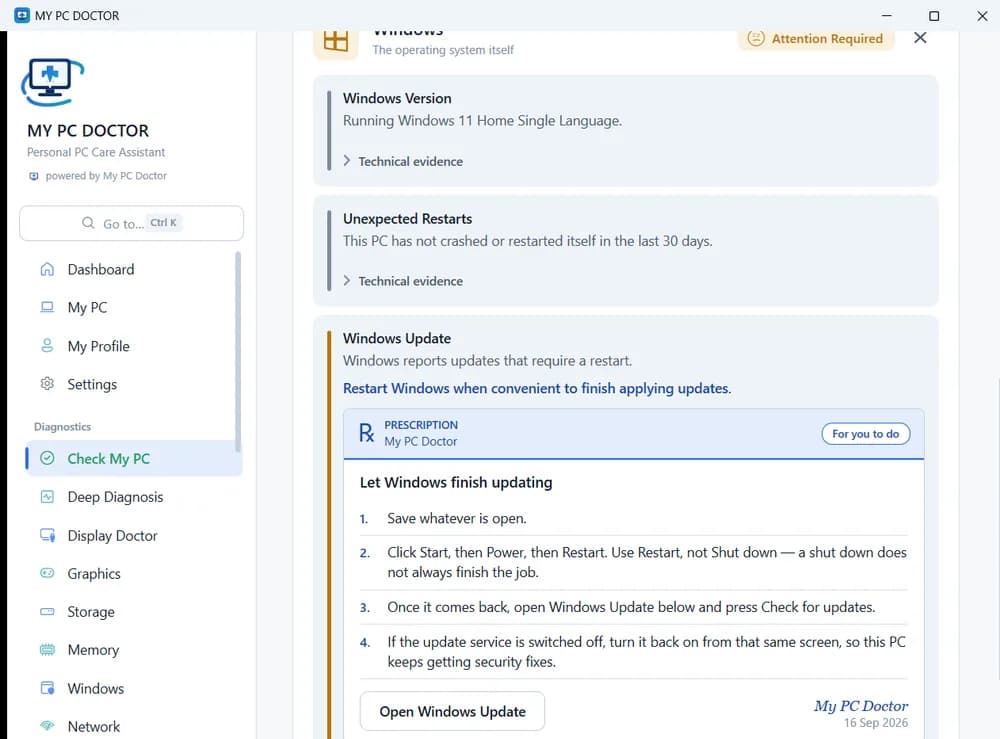
What My PC Doctor can help you check
PC Health Check
Windows
Drivers
Storage & SSD
Memory
Graphics
Display
Network
System Information
Health Report
How it works
- Step 1
Install
Install My PC Doctor on your Windows PC.
- Step 2
Check
Run a PC health check.
- Step 3
Understand
Review important PC information and issues.
- Step 4
Take action
Fix it yourself where appropriate, or contact us for technical support.
Your PC care starts with My PC Doctor.
Expert support starts with Yadav Computer Shop.
My PC Doctor
- PC health check
- Understand the issue
- Need technical help?
Yadav Computer Shop
- Diagnosis
- Repair & upgrade
- Installation & support
Start from your problem
What Should You Do When Your PC Has a Problem?
“My PC feels slow”
- 1Run My PC Doctor
- 2Review storage, memory and Windows
- 3Upgrade or tune-up needed?
- 4Contact Yadav Computer Shop
“My PC has hardware symptoms”
- 1Note what happens
- 2Check the PC information
- 3Talk to an engineer
- 4Hardware diagnosis
“Windows or driver problems”
- 1Run a PC health check
- 2Understand the status
- 3Follow the steps, or
- 4Get technical support
My PC Doctor reports what Windows and your hardware tell it; it does not diagnose every fault. When in doubt, ask an engineer.
How we service your computer
Request → Diagnosis → Service → Test
- 1
Request
Book online, call or walk in. Your device gets a job card.
- 2
Diagnosis
An engineer finds the cause before anything is replaced.
- 3
Service
Repair or upgrade after you approve the estimate.
- 4
Test
Tested before handover; we WhatsApp you when it is ready.
Why Yadav Computer Shop
Why Choose Yadav Computer Shop?
Experienced engineers
Desktop, laptop and printer work done by people who do it every day.
Proper diagnosis first
We find the cause before replacing anything.
Estimate before work
You approve the cost before parts are fitted.
Genuine parts
Parts that match your model, named on your bill.
Updates on WhatsApp
We message you when your device is ready.
Warranty on record
Warranty dates are kept against your device.
Local service desk in Raipur
A service desk you can walk into, not a call centre.
Remote support
Software problems solved without bringing the PC in, where possible.
Questions
Frequently Asked Questions
Straight answers about our services and My PC Doctor.
Do you provide computer repair in Raipur?
Yes. Yadav Computer Shop repairs and services desktops, laptops and printers in Raipur: diagnosis, hardware repair, screen and battery replacement, upgrades, Windows and software.
Do you replace laptop screens and batteries?
Yes, for supported models. We first confirm the fault, then fit a screen or battery that matches your laptop and test it.
Will I know the cost before the repair?
Yes. Every device gets a job card when you drop it off, and you approve an estimate before parts are fitted.
Do you install printers?
Yes: USB, Wi-Fi and network printers, drivers, sharing across office computers, and printing problems.
Do you provide remote computer support?
Yes, for software and setup problems that can be solved without touching the hardware. Hardware problems need the computer at our service desk.
What is My PC Doctor?
My PC Doctor is a Windows PC care assistant, offered and supported by Yadav Computer Shop and powered by Biz Brain AI. It checks important parts of your PC and explains what it finds in plain words.
Does My PC Doctor repair my computer automatically?
No. It checks and explains, and suggests the next step. Some steps you can do yourself; for repairs and upgrades, contact Yadav Computer Shop.
Need Computer Help?
From laptop repair and hardware problems to printer installation, upgrades and PC health checks — get the right support from Yadav Computer Shop.